Microsoft AI and Fabric Explained

What is Microsoft Fabric and how do Microsoft AI tools fit together?
Microsoft Fabric is a unified analytics platform that brings data engineering, warehousing, real-time intelligence, and Power BI into one governed environment. Microsoft AI tools, including Microsoft Copilot and Azure AI, sit on top of that data to generate insights, automate work, and support decisions. Together they form a connected Microsoft data and AI stack.
This page answers the questions buyers ask most often: what Microsoft Fabric actually does, how it compares to Databricks and Snowflake, which Microsoft AI products are worth attention, and how to reach production without runaway cost. Onyx Data is a Microsoft-aligned consultancy specialising in governed Fabric deployments, and we build cost control in from Day 1.
What is Microsoft Fabric?
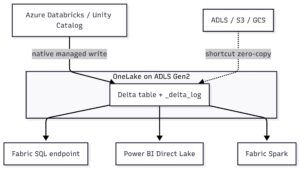
Microsoft Fabric is a software as a service analytics platform that unifies the tools data teams previously bought and stitched together separately. Rather than running a warehouse in one product, a lake in another, and reporting in a third, Fabric places these workloads on a single foundation with shared storage and shared governance.
The core building blocks
- OneLake: a single logical data lake for the whole organisation, reducing duplicate copies and movement.
- Data engineering and warehousing: pipelines, notebooks, and SQL warehousing in one place.
- Real-Time Intelligence: streaming ingestion and event-driven action through Data Activator.
- Power BI: semantic models and reporting integrated natively, not bolted on.
- Microsoft Copilot: natural language assistance across the platform.
The practical benefit is fewer integration points, clearer lineage, and a governance model that spans the whole estate. The risk is that an open, capacity-based platform can grow expensive and ungoverned if you deploy without standards. That is exactly the gap our governance-first methodology is built to close.
What are Microsoft AI tools and products?
The Microsoft AI portfolio spans several layers, and confusion usually comes from treating them as one thing. They are not. Each serves a different job.
Microsoft Copilot
Copilot is the assistive AI layer that appears across Microsoft 365, Power BI, and Fabric. When people search for ai tools for microsoft 365, this is usually what they mean: drafting, summarising, and querying inside the apps teams already use. In Fabric specifically, Copilot lets users ask questions about governance, cost, and performance in plain language.
Azure AI and Microsoft Foundry
Azure AI provides the model services, cognitive capabilities, and platform for building custom AI applications. Microsoft Foundry is the environment for developing, evaluating, and deploying AI agents and applications at enterprise scale. These are the tools you reach for when off-the-shelf Copilot is not enough and you need bespoke AI products.
For a broader walk through the portfolio, our explainer on what Microsoft AI tools are and where the innovation sits covers each layer in more depth, and our guide to critical questions when adopting Microsoft AI solutions sets out the governance and readiness checks to run before you commit.
Microsoft Fabric vs Databricks: which should you choose?
This is one of the most common comparisons we are asked to run. Both platforms handle large-scale data and analytics, but they suit different organisations.
Where Microsoft Fabric leads
- Tight integration with Power BI, Microsoft 365, and the wider Microsoft estate.
- A unified SaaS experience with less infrastructure to manage.
- Simpler licensing for organisations already standardised on Microsoft.
- Native Copilot and governance features across the platform.
Where Databricks leads
- Mature, code-first data engineering and machine learning workflows.
- Strong appeal for teams with deep Spark and data science requirements.
- Multi-cloud flexibility across providers.
The honest answer is that the better platform depends on your existing investments, your team’s skills, and your governance maturity. Organisations already committed to Microsoft 365 and Power BI usually find Fabric reduces friction. Data science heavy teams with multi-cloud needs may prefer Databricks. For a fuller breakdown, read our comprehensive Microsoft Fabric vs Databricks comparison.
Microsoft Fabric vs Snowflake: how do they differ?
Snowflake is a strong cloud data platform with a reputation for performance and elastic scaling. The comparison with Fabric tends to come down to scope and ecosystem.
Snowflake focuses on the data warehouse and increasingly the broader data cloud, and it is cloud-agnostic. Microsoft Fabric is broader in its native scope, covering engineering, real-time, warehousing, and reporting in one product, and it is deeply tied to the Microsoft ecosystem. If your reporting layer is Power BI and your productivity stack is Microsoft 365, Fabric removes integration work that you would otherwise carry with Snowflake. If you run a diverse multi-cloud estate and want best-in-class warehousing as a discrete layer, Snowflake remains a serious contender.
Whichever you select, the determining factor for success is rarely the engine. It is governance, ownership, and adoption. A well-governed Fabric estate beats a sprawling, ungoverned one on any platform.
What Microsoft Fabric services does Onyx Data offer?
We deliver governed Fabric outcomes rather than tool installation. Our services are structured so you can start small and scale with evidence.
| Service | Scope | Investment |
|---|---|---|
| Strategy and Enablement | Architecture reviews, training, governance foundations. Half-day to 5-day engagements. | GBP 5,000 to GBP 15,000 |
| 4-Week Fabric Accelerator | One governed, production use case in 4 weeks, plus a 90-day scale-out roadmap. | From GBP 25,000 (fixed scope) |
| FabOps Intelligence Platform | Governance scoring, cost optimisation, and performance monitoring built for Fabric. | 30-day free trial via Azure Marketplace |
The Strategy and Enablement and 4-Week Fabric Accelerator engagements are available on Azure Marketplace, with Microsoft co-funded options on the Accelerator. Our FabOps Intelligence platform adds real-time governance scoring across eight dimensions: Collaboration, Cost Efficiency, Data Quality, Governance, Modernisation, Optimisation, Performance, and Security.
Where Microsoft AI delivers measurable value
The strongest outcomes come from applying AI to a specific, governed business problem rather than deploying broadly and hoping. Predictive use cases are a good example, as set out in our piece on how predictive analytics is transforming industries. And because Power BI sits at the heart of the Fabric reporting layer, getting the fundamentals right matters: our 10 best practices for using Power BI in your business intelligence strategy covers the disciplines that keep reporting reliable as you scale.
Buyer FAQ
How much does a Microsoft Fabric engagement cost?
Entry points are deliberately low risk. Strategy and Enablement runs from GBP 5,000 to GBP 15,000, and the 4-Week Fabric Accelerator starts from GBP 25,000 on a fixed scope, with Microsoft co-funded options that may reduce your net cost. FabOps offers a 30-day free trial through Azure Marketplace with no setup fees, so you can assess governance and cost insights before committing.
How long until we see results?
The Fabric Accelerator delivers one governed, production use case in four weeks, including a governance baseline scored by FabOps and an executive dashboard. Across our engagements we have seen concept-to-production timelines as short as six weeks. Your own timeline depends on data readiness and scope, which we assess during the initial strategy work.
How do you handle governance and cost control?
Governance is built in from Day 1, not added later. FabOps provides real-time governance scoring, spend attribution, and capacity analysis, with cost reductions in the region of 30 to 50 percent typical in the first 90 days, depending on your estate. User access governance flags shadow workspaces and compliance gaps. We never place client or regulated data on public pages, and our work follows a governance-first sequence: define outcomes, set standards, then build.
Should we build this in-house or bring in a partner?
Building in-house is viable if you have the certified skills, the time, and the governance discipline already in place. Many teams do not, and they spend months learning patterns we apply routinely. Our practice of 60-plus Microsoft-certified consultants lets you move faster and avoid expensive rework, while we upskill your team so you retain ownership. It is rarely a pure build-or-buy choice; most clients use us to accelerate and then run it themselves.
Will this actually reach production, or stall as a pilot?
Reaching production is the explicit goal of the Accelerator, which is scoped around one live use case rather than a demo. The most common reason pilots stall is missing governance, ownership, and a scale-out plan. We address all three from the start and measure adoption and ROI like a product, which is how use cases move from proof of concept to dependable operation.
How do you get started?
The most useful first step is a focused conversation about your estate, your goals, and where Microsoft Fabric and Microsoft AI can deliver a governed production result fastest. We will talk through your current platforms, your governance needs, and the shortest credible route to value.
Book a 30-minute strategy call with Onyx Data and we will map a practical, governed path from where you are now to a production outcome your leaders will trust.
Related Articles