OneLake as native storage for Azure Databricks: read the table format, not the brochure

Most teams treat the new Fabric and Databricks interoperability as a connector story. It is a storage-contract story, and that distinction decides whether you end up with one governed copy of data or two systems quietly fighting over the same Delta log.
The wrong mental model, and why it feels right
The instinct is to file this under “another integration”. You have Databricks, you have Fabric, and now there is a bridge between them. So teams reach for the pattern they already trust: pick a primary, replicate to the secondary, schedule a sync, reconcile on a cadence. It feels safe because it is the pattern that has survived every previous multi-engine setup. Two stores, one pipeline, a watermark column to prove freshness.
That model is exactly what the OneLake storage option removes, and keeping it means you pay for duplication you no longer need while inheriting the reconciliation bugs you always hated. The integration is not a faster pipeline between two lakes. It is the elimination of the second lake.
The real mechanism: a shared Delta log on shared storage
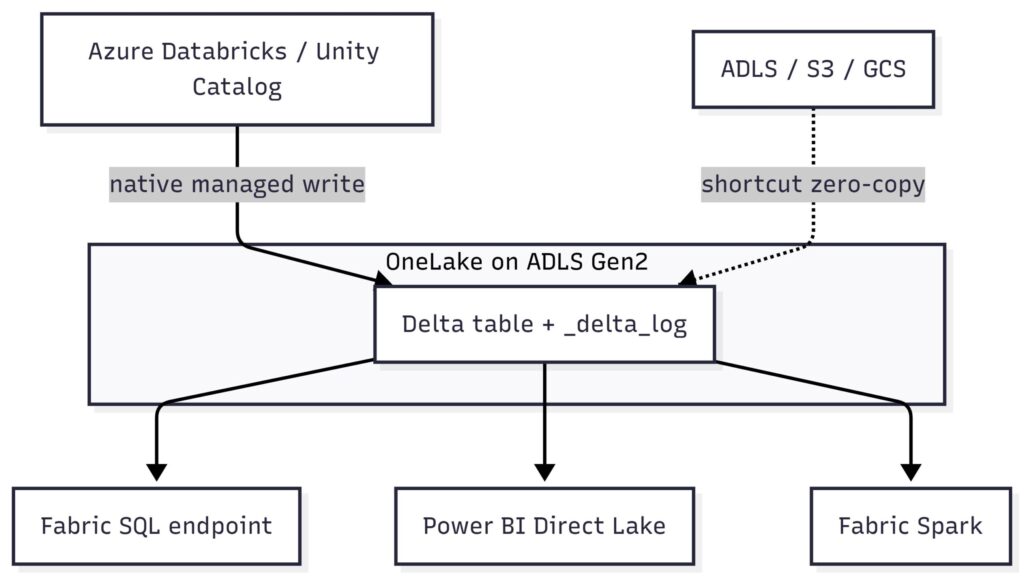
OneLake is built on Azure Data Lake Storage Gen2 and stores tabular data in Delta Parquet, exposed over open APIs so multiple compute engines can read and write the same files without conversion OneLake foundation, external integration. Azure Databricks can now read data in OneLake (GA) and store Unity Catalog managed tables natively in OneLake (beta).
The part that changes your architecture, when Databricks writes a Unity Catalog managed table to OneLake, the Delta table and its transaction log physically live in OneLake. Fabric engines read OneLake as their native store with no extra setup. So a commit from a Databricks job and a read from a Fabric SQL endpoint are hitting the same `_delta_log`, not two synchronised copies of it. There is no watermark to chase because there is no second table to fall behind.
This is different from a shortcut. A shortcut is a logical pointer that mounts data sitting in external storage, giving zero-copy access without moving files. Native storage is the inverse: the bytes start in OneLake and Databricks treats it as its managed location. Both give you a single copy. They differ on who owns the storage and who governs writes, and that is the decision you actually have to make.
The second-order effect is where this bites. One Delta log means one writer discipline. Two engines committing to the same table can produce concurrent-write conflicts, and table maintenance now has an owner question. If a Databricks job runs `OPTIMIZE` and Fabric runs its own compaction against the same files, you get contention and wasted compute, not corruption, but not free either. Direct Lake also depends on Parquet layout: if your maintenance regime changes file sizes or rewrites the log aggressively, query performance on the Fabric side shifts without anyone touching a Fabric setting.
The fix: assign write ownership per table, not per platform
Do not split by platform. Split by table, and write the rule down.
For each table, name one platform as the writer. The other reads. If Databricks owns a curated Delta table written natively to OneLake, Fabric consumes it through the SQL endpoint and Direct Lake, and Fabric runs no maintenance against it. Let the writing engine own `OPTIMIZE`, vacuum, and statistics for the tables it writes. This keeps the single-copy benefit without the contention.
Where you genuinely need both engines to write the same table, treat that as a designed exception, not a default. Serialise the writers, agree a maintenance window, and confirm both sides are on compatible Delta reader and writer protocol versions. Deletion vectors and column mapping are the usual sources of a “works in one engine, fails in the other” surprise, so pin those features deliberately rather than letting a runtime upgrade enable them silently.
Trade-offs, named plainly. Native storage gives you the cleanest governance story because the data and its OneLake catalog metadata live together, discoverable across the tenant. The cost is that you commit to OneLake as the system of record for those tables, and your Databricks storage decisions now run through Fabric tenant and workspace boundaries. Shortcuts keep storage where it is and reduce that commitment, but the catalogue and lineage story is thinner because the bytes sit outside OneLake. Pick native for the tables you want governed by default. Pick shortcuts for data you are not ready to relocate.
One more practitioner caveat. Beta means the native write path will tighten over time, so build your ownership rules as configuration you can revise, not as tribal knowledge in someone’s notebook. The mechanism is stable; the feature surface is still moving.
The platforms are converging on a shared storage contract, which means your real architectural advantage is no longer engine choice but write governance over a common log. The takeaway is stop syncing copies, assign one writer per table, and let every other engine read.
Related Articles